Several recipients
You sent it to five people. Which of them read it?
Onmindo answers that with a name, a time and the app they read it in. Most trackers report that somebody on the message opened it and leave you to guess which one.
Onmindo delivers a separate copy to every recipient, under the single To line you typed, so an open belongs to one person rather than to a group. Everyone still sees everyone. It needs the full Gmail permission, because Gmail's own submission server accepts no narrower one, and Onmindo asks for it only when you switch this on.
What a group email can and cannot tell you
The difference is not in the reporting. It is in how the message left. One email addressed to five people is one thing arriving in five places, and there is no honest way to work out which of the five looked at it. Five copies are five separate things, and each one carries its own record.
| How the message went out | What an open tells you |
|---|---|
| A copy each under one shared To line, threaded into one conversation. What Onmindo does on the full permission | The name of the person who opened it, the time, and the client they read it in |
| One email addressed to all five, which is what you get elsewhere | That one of the five opened it. Onmindo says somebody on the message did and does not pick a name |
What your recipients see
An ordinary group email. The To and Cc lines every recipient sees are the ones you typed, so they see each other and reply to each other exactly as they would on any group message you send by hand. What differs between the copies is the tracking pixel, and only the pixel. Bcc recipients are delivered to without appearing in a header, because a Bcc that everyone can read is not a Bcc. You can turn tracking off for a single message in the compose panel before you press Send, and that message then goes out with one shared pixel like anyone else's.
Your side stays tidy either way. The five copies are threaded into one Gmail conversation, so a send to five people is one thread in your mail rather than five.
Where the answer shows up
- On the Gmail row itself, as a count, without opening anything.
- In the hover card on that row, which names each reader, the time and the client.
- In the dashboard, one row per copy, which keeps working with the extension uninstalled.
All three listen to a live stream from the server, so an open lands while you are looking at the page.
The record
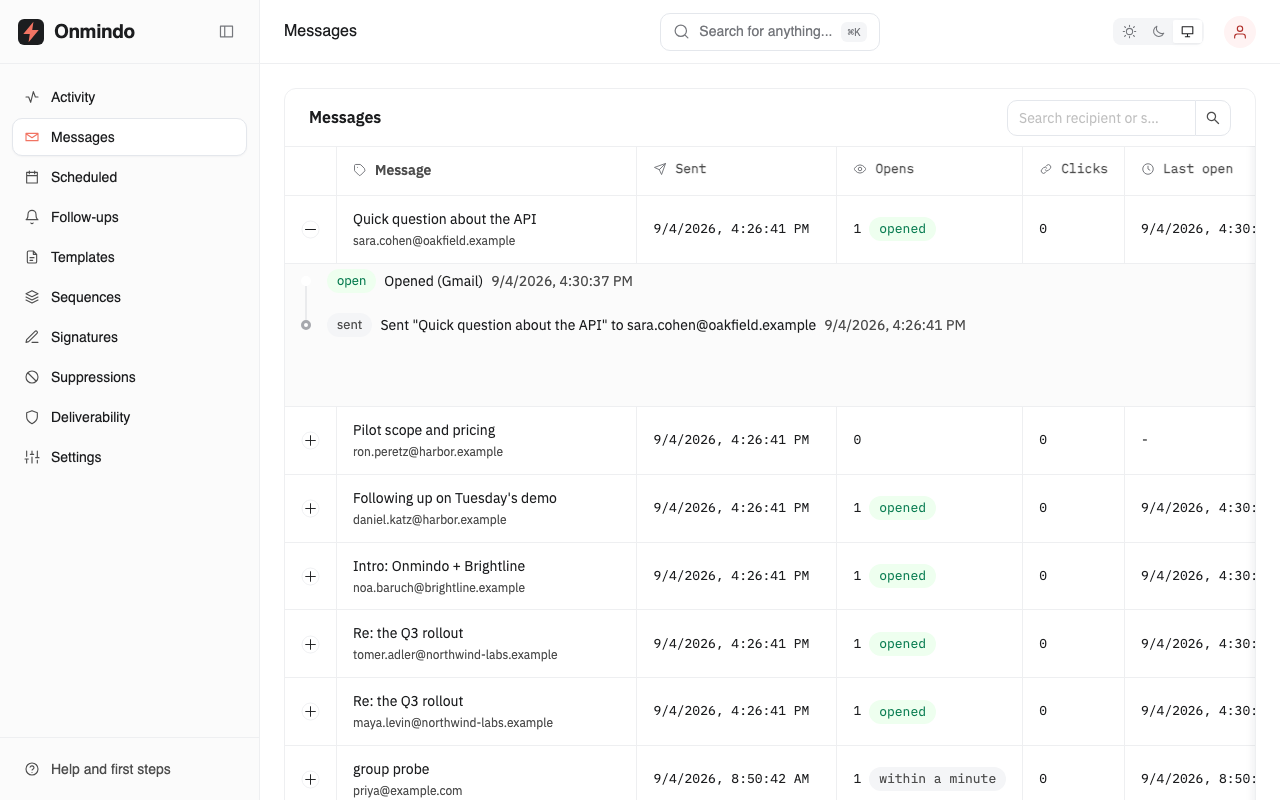
One send to two people, two rows
This is a real capture of the Onmindo dashboard after one message to two colleagues at the same company. Each row is one person's copy, and the opens on a row are theirs.
What per-recipient tracking still will not tell you
A name on an open means a mail client drew the message for that person. It does not mean they read the words, and Onmindo never says they did. Three more limits are worth knowing before you act on a number:
- Gmail touches every message as it lands. Onmindo records that as delivered and never as an open, which is the difference most trackers do not draw.
- A Gmail reader has no city and no device next to their open. Google loads images through its own servers, so there is nothing true to put there.
- Someone who reads with images off produces nothing at all. An absent open is not evidence that a message went unread.
A named open is the strongest evidence email gives you. It is still evidence rather than proof, and Onmindo is built to keep those two words apart.
Questions
Tracking several recipients, answered
The privacy page is the long version of what is stored, and [email protected] answers anything not here.
How does Onmindo know which recipient opened?
It delivers one copy to each person over Gmail's own submission server, under the single To line you typed, so every copy carries its own tracking pixel and the opens recorded against a copy belong to one named person. That needs the full Gmail permission, which Onmindo asks for only when you switch this on. Without it, a single email addressed to several people carries one shared pixel, and Onmindo reports its opens as somebody on the message rather than picking a name.
Do my recipients see each other on the To line?
Yes, exactly as they would on any group email. The To and Cc lines every recipient sees are the ones you typed; what differs between the copies is the tracking pixel, and only that. Bcc recipients get no header, because a Bcc that appears in a header everyone reads is not a Bcc.
Can I turn it off for a single message?
Yes, in the compose panel, before you press Send. That message then goes to everyone as one ordinary email, and its opens are reported as somebody on the group rather than by name. The setting returns to per-recipient tracking for the next message.
Does my sent folder fill up with copies?
No. The copies are threaded into a single Gmail conversation, so one send to five people reads as one thread rather than five. Each recipient receives an ordinary message from your address and replies to it as they would to anything else.
Is per-recipient tracking a paid feature?
Not today, and it is the feature the published price is built around. Onmindo charges nothing at the moment: signup is open, takes no card, and per-recipient tracking works from the first message you send. The pricing page says it is intended for Pro at $9 a month, published in advance so that nobody meets the number on the day it starts being charged. Nothing is enforced yet, and nobody is moved onto a paid plan without being asked first.
Try it
Write to two addresses and watch two rows
Signup is free and takes a minute. Send one message to two of your own addresses, open it from one of them, and see which row moves.